Getting Ready
Connect the network cable to the Ethernet port and power on the board. Wait until the Ethernet indicator blinks steadily.
Advanced Quick Start
Open cmd or pwsh, run ssh root@<device-LAN-IP>, then enter the password lynx, for example:
ssh root@192.168.88.201Finding the Device LAN IP
On a local computer in the same LAN, open PowerShell and run the script below. Copy it, paste it, press Enter and wait for the result.
# ===== 1. Auto-detect the active network adapter and IPv4 =====
$nic = Get-NetIPConfiguration |
       Where-Object { $_.IPv4DefaultGateway -and $_.NetAdapter.Status -eq 'Up' } |
       Select-Object -First 1

if (-not $nic) { Write-Error "No active adapter with a default gateway found"; exit 1 }

$localIp = $nic.IPv4Address.IPAddress
Write-Host "Local adapter: $($nic.InterfaceAlias) | IP: $localIp" -ForegroundColor Cyan

# ===== 2. Derive the local /24 subnet =====
$base = ($localIp -split '\.')[0..2] -join '.'
Write-Host "Scanning subnet: $base.0/24 ..." -ForegroundColor Cyan

# ===== 3. Concurrent ping sweep + reverse DNS lookup =====
$online = 1..254 | ForEach-Object -Parallel {
    $target = "$using:base.$_"
    if (Test-Connection -ComputerName $target -Count 1 -TimeoutSeconds 1 -Quiet) {
        $name = $null
        try { $name = ([System.Net.Dns]::GetHostEntry($target)).HostName } catch {}
        [PSCustomObject]@{ IP = $target; HostName = $name }
    }
} -ThrottleLimit 128

# ===== 4. Fill in MAC addresses from the ARP table =====
$arp = @{}
if (Get-Command Get-NetNeighbor -ErrorAction SilentlyContinue) {
    # Windows
    Get-NetNeighbor -AddressFamily IPv4 -State Reachable, Stale -ErrorAction SilentlyContinue |
        ForEach-Object { $arp[$_.IPAddress] = $_.LinkLayerAddress }
} else {
    # Linux / macOS
    (arp -a 2>$null) | ForEach-Object {
        if ($_ -match '^\s*([\d\.]+)\s+[\w:-]+\s+([\da-fA-F:.-]+)') { $arp[$matches[1]] = $matches[2] }
    }
}

# ===== 5. Print results =====
$result = $online | Sort-Object { [int]($_.IP -split '\.' | Select-Object -Last 1) } | ForEach-Object {
    [PSCustomObject]@{
        IP       = $_.IP
        HostName = if ($_.HostName) { $_.HostName } else { '-' }
        MAC      = if ($arp.ContainsKey($_.IP)) { $arp[$_.IP] } else { '-' }
    }
}

Write-Host "`n=== Online devices in subnet $base.0/24 ===" -ForegroundColor Green
$result | Format-Table -AutoSize
Find the device IP in the scan result
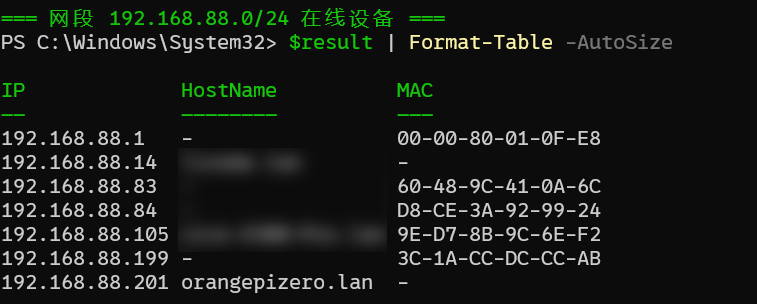
In the screenshot above, orangepizero.lan is the device, with IP 192.168.88.201.
Alternatively, check the connected device IP in your router admin page, or use a tool such as Angry IP Scanner.
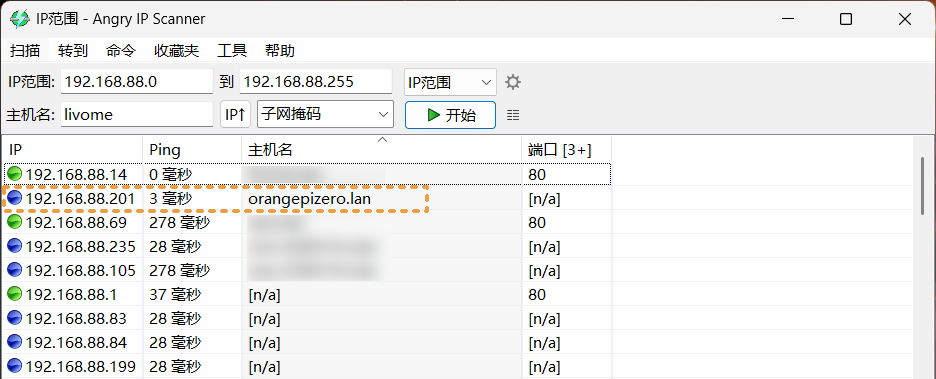
Angry IP Scannerdownload link